SnapRAID NAS Storage
Published: May 01, 2024Introduction
When I got serious about media storage, I purchased a 14TB HDD in late 2022. I didn't have the means to build a real Linux server, so I chucked it in my Windows PC as NTFS and called it a day.
August 2023, my dad upgraded our home internet upload, making it feasible to stream media from my dorm. I installed the drive in a Linux server: I simply plugged it in and installed ntfs-3g, with no formatting or migration needed. It worked great, but I wanted parity.
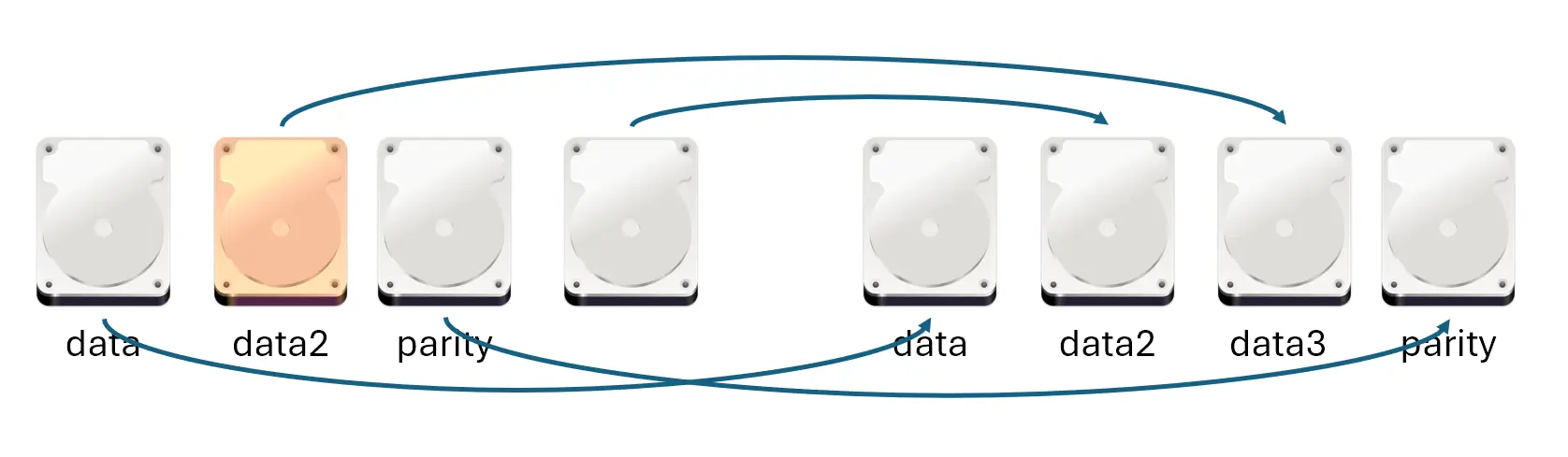
April 2024, I got 2 more 14TB drives from serverpartdeals and built a SnapRAID array. Once again, I didn't have to do any rebuilding, formatting or migration. I simply installed the drives and configured a few lines in SnapRAID.
March 2025, I snagged another 14TB drive from Facebook Marketplace, and 10 minutes later (not 10 hours), my array increased by 14TB. At the same time, I also performed disaster recovery and rebuilt the array. The process completed within a day and with zero data loss, I was prepared.
Despite having 4x14TB drives, my server idles at 20-30W because 3 of 4 drives are spun down 90+% of the time. With 1 parity drive, my utilization is 75% and I can withstand 1 drive failure.
The storage array I described for a media server seems too good to be true. I will explain how I built it, the design decisions I made, disaster recovery scenarios I tested and all the reasons why I chose SnapRAID to be the perfect solution for my needs.
RAID
Traditional RAID solutions such as RAID5 or RAIDZ provide parity across multiple disks, allowing the array to survive a drive failure while using most of the available capacity. With three drives, one disk worth of capacity is effectively used for parity while the remaining two are available for data.
That model works well in many environments, but several limitations were a poor fit for my media server.
My existing 14TB drive was already formatted as NTFS and contained data. Creating a conventional RAID array would require backing up the existing data and formatting the drive, then building the array. This is time-consuming, introduces unnecessary risks, or is not feasible.
Traditional striped RAID also stripes the data across the disks. Reading a large file with cat somelargefile or writing data and updating parity can wake multiple drives if they're spun down. In a server, many reads and writes occur and cannot be avoided; the drives might as well be spinning all the time.
Expansion was another concern. Adding capacity to a conventional array often requires an array reshape or rebuild, which can reduce performance or require downtime. In addition, it requires disks of the same or larger size, which makes it harder to take advantage of inexpensive used drives.
When mixing drives of various sizes in a traditional RAID, the smallest drive is the limiting factor, and the remaining space on larger drives is wasted. Synology Hybrid RAID (SHR) addresses this limitation, but the issues of rebuilds, possible downtime and drive spin-up remain.
SnapRAID
All of these limitations led me to explore alternatives, such as SnapRAID. My inspiration came from Perfect Media Server.
SnapRAID works differently compared to traditional RAID; it's similar to UnRAID or RAID4 where parity is stored on a single drive. The limitation is that the parity is not real-time. Every time a file is changed, it must be synced manually; if not, all changes after the last sync cannot be recovered. And given that SnapRAID treats data disks as JBOD (Just a Bunch of Disks), all file operations are still done on the disk itself; there is no performance benefit. Both of these factors are irrelevant for a media server consisting of mostly static files.
SnapRAID's limitation is also a benefit: I can spin down disks when not in use, saving power. If I run a snapraid sync every other night, and it takes 20 minutes on average, that is only 20/2880 minutes in two days, or 0.7% of the time. It's not just parity: suppose a data disk is rarely used, that disk can be spun down as well, saving more power. Yet SnapRAID still offers the protection of RAID. I can add any size of disk I want. As long as the parity disk is the largest disk, all disks I add will be usable.
In my original setup, I kept the existing NTFS drive as is, formatted the two new drives as EXT4, added their mountpoints to /etc/snapraid.conf, and generated parity with snapraid sync. Nothing on my NTFS drive was changed, except the fact that the data is protected by parity. There was no downtime.
SnapRAID is essentially JBOD; if the parity disk fails, you're lucky. If a data disk fails, only data on that disk is lost; others are unaffected and safe. As for server failure, I can simply attach any other disks to another computer, even just a single disk, and carry on with business as usual.
If it were any other solution, the fact I used the drive in Windows would be a showstopper. Yet with SnapRAID, a Windows computer can be my exit plan.
MergerFS
Since SnapRAID treats the disks as JBOD, a common way to combine these drives together is using MergerFS. Suppose disks are mounted at /mnt/disk1 and /mnt/disk2. MergerFS can combine them into a single /mnt/array where all files are accessible. This is convenient for Linux applications and ease of management, but ultimately I chose not to use MergerFS because I wanted finer control of where the data goes and when.
In my setup I have a WD Red drive which is a bit more power efficient than the other Toshiba drives; therefore, I'd utilize that more while keeping the others for archival media and frequently spun down. Using mfs (most free space) as a simple example, my WD drive may not be the drive with the most free space, and I didn't want to risk MergerFS having to spin up another drive to read or write files.
The main advantage of MergerFS is that it combines different disk paths into a single one, abstracting them from the application when it accesses a file. I’d only need to configure the MergerFS mountpoint for my media files. However, with most applications, such as Jellyfin and the arr stack, it's possible to configure multiple paths for media files and I've had no issues with that.
Battle Tested
In 2024, when I purchased 2 more drives, I didn't use them right away. First, I connected them to my desktop in a Debian dual-boot. I had to decide whether to use NTFS or EXT4. NTFS would be consistent with my existing drive and also allow me to use it natively in Windows in case of a disaster, but EXT4 is native to Linux.
While I didn't find any power efficiency differences, EXT4 performed roughly 20% better than NTFS for typical media server workloads, like moving large files, MKVToolNix, ffmpeg, etc. Unfortunately, the University of Alberta deleted my filesystem analysis document from OneDrive. Speak of the irony of backup.
Disaster Recovery Scenario
SnapRAID provides comprehensive documentation on operations, especially recovering data. However, during a disaster, people are often panicked and unprepared. I wanted to test and document the recovery process before I ever needed it. With the 2 new drives, I added an SSD for parity and a 2TB drive as the restore target. I created random files on the 2 new drives and ran snapraid sync as a baseline.
To simulate a disaster, I unplugged one drive. Since this is a test with no real data, I was calm and thoroughly read the SnapRAID documentation. I found out that recovery simply needed a config file change and snapraid -d <disk_label> -l fix.log fix to restore the data.
I documented my process in SnapRAID documentation. The test was successful, and more importantly, I now knew exactly what to do in a real failure.
Real-World Recovery
In March 2025, my dad had issues with movie playback which I also reproduced. A large portion of my Jellyfin library was missing and one of the drives had disappeared from the server. I tried different SATA ports and cables, and eventually connected the drive to another computer. To my surprise, the drive itself was working normally. I was able to read from it through VMware, with my USB disk adapter passed through to a Debian VM.
I eventually traced the issue to aggressive power-saving settings from powertop --auto-tune on the SATA controller. I was obsessed with C-states and idle power; the drive was fine. Even so, I no longer trust that drive, so I used it to store things I care less about, like already watched movies. I then used a new drive I purchased from Facebook Marketplace as the replacement target.
Just like the simulated disaster, I added the drive, updated the SnapRAID configuration, and ran snapraid fix in a screen session. The next morning, all data had been restored successfully. After disabling power tuning, all drives are working normally. I had prepared for the disaster before it happened, so I already knew how to recover in a real incident.
Production Setup
My documentation about SnapRAID
I have a WD Red 14TB as a data drive and 3 Toshiba 14TB drives, 2 as data and 1 as parity. Since the WD Red drive is power efficient, I've used it as a "live disk" for generic bulk storage, rather than figuring out how each application accessed the data. The other 2 data disks are for media files. My parity drive is always spun down except when I run snapraid sync.
For spindown, I used hd-idle. Unfortunately, the apt repository version doesn't support disk UUID, so I had to use sdX for the configuration, but I had a crontab on reboot that parses the mountpoint to sdX and updates the configuration. In 2025, I installed hd-idle from GitHub, but the configuration and crontab still remain.
HD_IDLE_OPTS="-i 0 -a sda -i 120 -a sdd -i 60 -a sdc -i 60 -l /var/log/hd-idle.log"
With this setup, I incur the power cost of 1 drive, yet still have massive storage and 1 disk worth of parity.
SnapRAID Runner
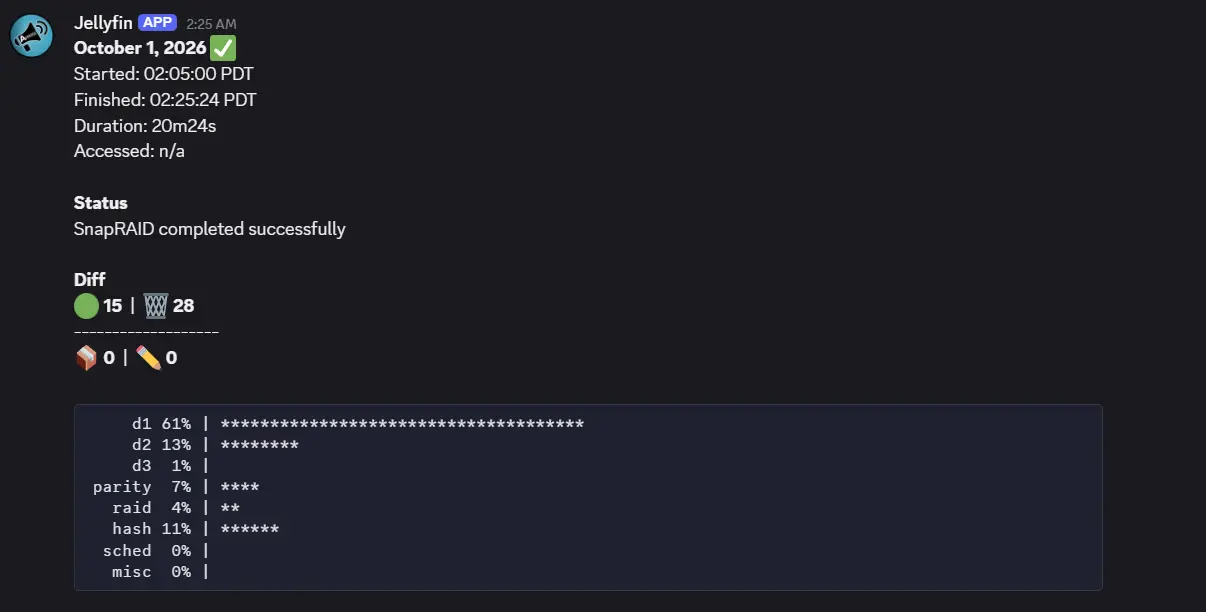
The sync process is manual. Initially, I just occasionally connected to the server via SSH and ran snapraid diff and snapraid sync. But it can be automated with chronial/snapraid-runner, though I chose a fork that provides Apprise support; the original only supported email/SMTP. The automation runs snapraid diff; if there are changes, it runs snapraid sync, and if diff shows too many deleted files (could imply a disaster), it doesn't sync.
I simply threw it into a systemd service and a timer every 48 hours, and it just works. In 2026, I used Codex to further stylize the notification it sends over Apprise.
The "Real" Disaster of 2026
The random controller failure like in 2025 pales in comparison to the disaster that can occur in 2026 and beyond. The current price of HDDs is insane, 3 to 5 times what it used to cost. If I opted to use any other RAID solution, and I encountered a disk failure, the random 1/2/4TB drives I panic bought ain't gonna save me; because of the RAID limitation, my array is now held hostage, and my data, gone forever, zero recovery.
Whereas with SnapRAID, if a parity drive fails, then I just live dangerously. If a data drive fails, I only lose the data on that drive; I could live with it. And if I operate carefully and practice disaster recovery, chances are I could recover the lost data to the 1/2/4TB emergency drives. This is the kind of contingency plan and reassurance I need.
Conclusion
Overall, the advantages of SnapRAID cannot be overstated. My setup remained flexible and efficient as I expanded my storage needs. The project reinforced that the best storage solution is not necessarily the most popular one on YouTube tutorials, but the one that is tailored to my specific needs with the tradeoffs I understand and the failure mode I'm prepared to handle.