Oracle Cloud VPS Tunneling
Published: March 03, 2023Introduction
Accessing self-hosted services remotely is simple: forward ports 443 and 25565 on my router, and I’m done. However, when I was living on campus, I had no access to the router and therefore could not forward ports to my services. This was a problem because I, my parents, and my friends still needed remote access.
WireGuard at Home (Why It's Not Acceptable)
I already hosted several services at home that I accessed regularly. For administrative panels, exposing them directly to the public internet through a reverse proxy was not ideal, so I used WireGuard VPN instead. Only authorized clients with the proper public/private key pairs could connect and access the applications.
Because WireGuard creates a bidirectional virtual private network, my dorm PC became reachable from home through its WireGuard IP address. I could point services at home to the dorm PC's WireGuard address, and it worked exactly as expected. This felt like a solved problem.
But I do not find the reverse VPN acceptable.
The obvious issue was that every client would need WireGuard installed. More importantly, the remote side effectively needed to act as the VPN server, requiring port forwarding on its router. The reverse VPN only works for my parents because I have it set up at home, but for my friends, it's not realistic to ask them to configure their network.
At the same time, I learned about CG-NAT and how devastating it is. I wanted a robust CG-NAT Preparedness Plan, and this solution is not it.
Tailscale
Tailscale is based on WireGuard and creates a virtual mesh network between devices. However, Tailscale uses NAT traversal and relays which do not require port forwarding for connectivity. Now clients no longer need to become a server, and connectivity should work behind CG-NAT. This is closer to the solution, but no. Tailscale requires all users to install the client and join my tailnet before they can access my services. This is not acceptable for less technical users.
Oracle Cloud
I wanted a solution that is more common, universal and works behind CG-NAT. So no, I didn't take the easy route and type my PC's WireGuard address into Jellyfin or install Tailscale. I need a client-less solution, accessible to anyone by sharing a URL. While it's not possible to forward ports on the dorm network, I can use a VPS with public internet access as a relay.
Oracle Cloud Free Tier
I looked online. Most VPS providers required a monthly fee, but I found Oracle Cloud Free Tier and it's quite generous, giving up to 4 cores and 24 GB of RAM with good bandwidth at no cost. All I need is a credit card for verification. Back in 2023, the signup process was simple, unlike in 2026.
Now for the region: this is where I made my biggest mistake and the consequences continued until 2026.
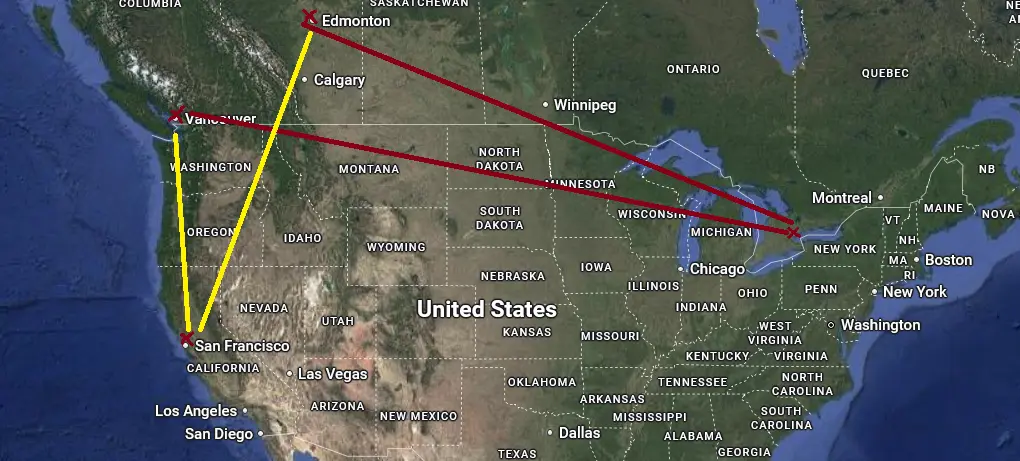
I have Toronto, Montreal, San Jose and others. Since my dorm was in Edmonton, Alberta while my home was in Vancouver, BC, I chose Toronto because Edmonton is geographically closer to Toronto than Vancouver. I completely forgot to check the distance between Toronto and San Jose, which is actually much closer. Unfortunately, it's not possible to change the region after an account is created.
Provisioning VPS
I chose the AMD VM.Standard.E2 shape with 0.5 OCPU and 512 MB of RAM. I hadn’t explored ARM shapes (up to 4 OCPUs and 24 GB of RAM) yet.
Creating the instance was straightforward. I selected Ubuntu, chose the instance shape, downloaded the SSH private key and connected via SSH.
The performance isn't great. I tried deploying BookStack in Docker, but because it required MySQL, the VPS was not powerful enough to run it. So running Minecraft which requires significant resources directly on the VPS is not possible, but for tunneling traffic and Tailscale, it's sufficient.
Firewall
Oracle Cloud firewalls/security lists behave differently. Essentially, there are 2 layers, the Oracle Cloud console and the instance OS. Incoming traffic needs to be allowed through both layers. I opted to allow everything on the Oracle Cloud console, because logging into my Oracle Cloud account is inconvenient, whereas SSH management is immediate.

Just because I allowed everything doesn’t make the VPS vulnerable: a port is only considered open if a process is listening on it. This is why I opted to install firewalld on the VPS, denying all traffic except for the traffic I need. (I didn't know Tailscale benefits from port 41641/udp but that didn't affect connectivity).
sudo firewall-cmd --zone=public --add-port 19132/tcp --permanent
sudo firewall-cmd --zone=public --add-port 19132/udp --permanent
sudo firewall-cmd --zone=public --add-port 25565/tcp --permanent
sudo firewall-cmd --zone=public --add-port 25565/udp --permanent
sudo firewall-cmd --zone=public --add-port 80/tcp --permanent
sudo firewall-cmd --zone=public --add-port 443/tcp --permanent
sudo firewall-cmd --zone=public --add-port 5800/tcp --permanent
sudo firewall-cmd --reload
VPS Tunneling
Tailscale
I just explained why Tailscale is not acceptable, yet I still used it.
The architecture is different. The VPS was publicly accessible, while the dorm PC was reachable privately over Tailscale. As long as the VPS could reach the dorm PC, it could proxy traffic to services running there.
Since the VPS is public, I could technically have used WireGuard, but Tailscale setup and configuration are significantly easier. I simply installed Tailscale on both sides and logged in; no manual key generation or configuration was required.
To verify the setup, I tested whether the VPS could reach my dorm PC and the services running on it through the Tailscale address. The dorm PC became an extension of the VPS.
Web Servers with Caddy
My documentation on Caddy server for basic web services
For basic web services like Jellyfin, a reverse proxy is sufficient. I opted to use Caddy server, which provides automatic HTTPS and an easy-to-configure Caddyfile. The reverse proxy configuration is almost identical to hosting at home: instead of using a local IP address, I used the Tailscale IP 100.x.y.z of my dorm PC. That's it.
movies.yoursubdomain.duckdns.org {
        reverse_proxy http://100.x.y.z:8096
}
My parents, or anyone else with the URL, could now access Jellyfin from anywhere without installing additional software. The connection was also encrypted over HTTPS.
Minecraft
My documentation on Nginx for Minecraft
While I think it's possible to use Caddy, I opted for Nginx given online tutorials mentioned it. For a Java server, it must be 25565/tcp (unless SRV record is configured), so I configured Nginx to listen on 25565/tcp and forward the traffic to the Tailscale IP of my dorm PC. As for GeyserMC/Bedrock, the protocol is UDP, which Nginx supports.
stream {
     server {
           listen 25565;
           proxy_pass <tailscale_ip>:25565;
    }
    server {
           listen 19132 udp;
           proxy_pass <tailscale_ip>:19132;
    }
}
Since Caddy was already running and Nginx also tried to listen on port 80, Nginx failed at first. I just had to change the Nginx default server to port 81 instead.
Results and Conclusion
After tunneling my dorm PC to the VPS, all the services I host are now accessible from anywhere, without additional client software. My parents were able to stream movies from Jellyfin in good quality. Our dorm upload speed was only 30 Mbps, but electricity was free. I ran my PC 24/7 and used my RTX 2070 to transcode the movies to a 10 Mbps bitrate, at which they streamed flawlessly. My friends were able to play Minecraft with me. The latency from Edmonton to Toronto, then to Vancouver was not ideal, but the game was playable.
I chose to learn and understand the design instead of simply copying what's trending on YouTube or Reddit or taking the easy way out. Completing this project gave me more confidence in my CG-NAT Preparedness Plan. I ended up with a reproducible setup where I understood the architecture and the limitations, and one that I can adapt to different networks and cloud providers.